Seal a secret.
Deploy it.
Watch one pod open it.
The secret stays ciphertext in your store and at the ASTIS edge — decrypted only by the authorized workload (cluster, namespace, serviceaccount, image digest, environment), in RAM. Infrastructure access is not data access.
Dogfooded on a real Kubernetes cluster — step 3 below is a verbatim pod log. astis-cli + astis-exec.
# seal client-side — ASTIS never sees the plaintext
$ vault kv get -field=pwd secret/db | astis-cli --secret-id db-password
→ sealed.txt   ASTIS:v2:eyJhbGc…   (ciphertext)

# the pod unseals it in RAM, after 4-layer attestation
[astis-exec] unsealed DB_PASSWORD (sha256=0e965c33, 8 bytes)
[app] DB_PASSWORD len=8   # plaintext only in this pod's RAM

# proven on a real k8s cluster:
21/21 live checks → green  ·  0 plaintext at the edge
Seal the secret
SecOpsastis-cli wraps it client-side under your org WORKLOAD KEK — ASTIS never sees the plaintext. Encrypt-only by design: there is no --decrypt, ever.
# Workload-scoped API key from Portal — scope keys:lookup:workload, bound to the workload
$ export ASTIS_API_KEY="astis_live_sk_…"

# seal the DB password  (-y: required when piped · tr: strip astis-cli's trailing newline)
$ vault kv get -field=pwd secret/hr-portal \
    | astis-cli -y --secret-id db-password \
    | tr -d '\n' > sealed.txt

# astis-cli writes the resolved params to stderr; the pure envelope → sealed.txt:
Resolved encrypt parameters:
  alg:              HPKE-X25519-CHACHA20POLY1305 (ASTIS:v2)
  cluster_id:       gs-demo-eu1
  namespace:        hr-portal-demo
  serviceaccount:   sdk-exec
  secret_id:        db-password
  kek_fingerprint:  b0a858e3…

$ cat sealed.txt
ASTIS:v2:eyJhbGciOiJIUEtFLVgyNTUxOS1IS0RG…
Works from any source: vault kv get, op item get, pass show, --from-file, or --interactive. Plaintext never touches the shell.
Wire it into Kubernetes
DevOpsThe envelope is ciphertext — store it in a k8s Secret, Vault, or Git. The pod mounts its identity (Workload key + projected SA token) and wraps the app with astis-exec.
# idempotent: create-or-update the Secret holding the (newline-free) envelope
$ kubectl create secret generic hr-portal-db \
    --from-file=DB_PASSWORD=sealed.txt -n hr-portal-demo \
    --dry-run=client -o yaml | kubectl apply -f -

# pod spec (excerpt) — env exposes the envelope; astis-exec unseals it in RAM, then runs your app
spec:
  serviceAccountName: sdk-exec
  containers:
  - name: hr-portal
    command: ["astis-exec", "--fork", "--", "./hr-portal"]
    env:
    - name: DB_PASSWORD                  # astis-exec unseals any ASTIS:v2: env value
      valueFrom: { secretKeyRef: { name: hr-portal-db, key: DB_PASSWORD } }
    volumeMounts:
    - { name: astis-key,   mountPath: /etc/astis, readOnly: true }
    - { name: astis-token, mountPath: /var/run/secrets/astis-audience, readOnly: true }
  volumes:
  - name: astis-key
    secret: { secretName: sdk-exec-api-key, items: [{ key: api-key, path: api-key }] }
  - name: astis-token
    projected: { sources: [{ serviceAccountToken: { audience: astis.io, path: token } }] }
The Secret stores the sealed envelope, not a usable password — decode it in step 3. An etcd backup or cluster-read leaks only ciphertext.
The pod opens it — in RAM
runtimeastis-exec stays PID 1, unseals the env value after 4-layer attestation, then runs your unmodified app. The plaintext exists only in this pod's memory.
$ kubectl logs deploy/astis-exec-demo -n hr-portal-demo
[astis-exec] unsealed DB_PASSWORD (sha256=0e965c33ba2d, 8 bytes)
[astis-exec] unsealed DB_USER (sha256=4e16a8e4f4e9, 10 bytes)
[astis-exec] fork /usr/bin/sh pid=2663 — astis-exec stays PID 1 (supervise, signal-forward, reap)
[app] DB_USER len=10
[app] DB_PASSWORD len=8   # plaintext only in this pod's RAM — the app never knew it was sealed
[app] unmodified app, ASTIS-unaware

# at rest the Secret data is still the sealed envelope (default get hides data — decode it):
$ kubectl get secret sdk-exec-db-password -n hr-portal-demo -o jsonpath='{.data.envelope}' | base64 -d
ASTIS:v2:eyJhbGciOiJIUEtF…
Verbatim, unedited pod logs from our demo cluster (gs-demo-eu1) — the astis-exec-demo dogfood pod, same sdk-exec binding as above. A real PostgreSQL on the same cluster boots the same way (demo-postgres: astis-exec unseals POSTGRES_PASSWORD, then database system is ready to accept connections). Copy the envelope or the API key to another pod → it unwraps nothing.
Two ways to integrate — pick per app
This page shows the zero-code path. Both are open source and share the same attestation and wire contract.
Path A · this page · astis-exec
For unmodified apps: astis-exec unseals ASTIS:v2: env values, then runs your binary. Plaintext passes through the child process's env — pair it with privilege-drop (see “can root read it?” below).
Source — 196 lines of Go, read it yourself · signed builds
Path B · SDK in your code
Your app calls fromKubernetes().openSecret(): plaintext exists only in your process's memory, never in env or files. Python / Go / Node.js / Java + a Spring Boot starter (zero-code property injection).
astis-io/astis-sdk · deployable cluster example · per-language quickstart
Between step 2 and 3 — the key chain (server-side, the CLI doesn't print this)
- The pod presents its Workload key + SA JWT; the gateway attests cluster / namespace / serviceaccount / image digest.
- CVS re-wraps the secret's DEK: org Workload KEK → this pod's ephemeral key. The ASTIS edge sees only a capsule + a proof.
- astis-exec decrypts the DEK with that ephemeral key, in RAM — and only on this pod. The API key alone, or any single factor, unwraps nothing.
And once it's decrypted — can root read it?
In fork mode the plaintext lands only in the child process's environment — astis-exec (PID 1) keeps ciphertext. Once the app drops privileges, its /proc/<pid>/environ becomes non-dumpable: even root inside the pod can't read it without CAP_SYS_PTRACE. We tested this — env-var exposure for privilege-dropped processes is far smaller than the folklore.
Honest boundary: node-root with ptrace, an added CAP_SYS_PTRACE, or a process that never drops privileges can still read live memory. ASTIS protects key custody and the unseal gate — not a host you have already lost.
What binds the unseal
It isn't "one pod" — the unseal is scoped to the workload's identity: cluster, namespace, serviceaccount, image digest, and environment, with an optional pod name to narrow to a single replica. RFC-020's four-layer attestation enforces it at unseal time. So it scales to every replica of a service, isolates one service from another, and keeps test apart from live.
Cluster
Only your registered cluster — its JWKS is pinned at registration (trust-on-first-use).
Namespace
Read from the k8s-signed ServiceAccount token; it must match the binding.
ServiceAccount
The workload identity. Each service gets its own key — services can't read each other's secrets.
Pod (optional)
Narrow to a single pod (StatefulSet pod-0 style), or leave it open to every replica under the SA.
Image digest
Layer 4 — only approved image digests unseal. A renamed pod on an unapproved image is refused.
Environment
The KEK is keyed by (org, domain, environment). A test key cannot unwrap live material, and vice-versa.
Wrapping a process is easy. This isn't the wrapper.
Plenty of tools inject secrets into a pod. The difference is what they trust: ASTIS keeps the edge zero-knowledge and gates every unseal behind four independent factors.
Store it anywhere
k8s Secret, Vault, a KMS, Git, your config server — the ASTIS:v2: envelope is self-describing.
Safe in the clear
Already ciphertext sealed to the workload; cluster read or an etcd backup sees nothing usable.
Opens for one workload
Scoped to the workload — cluster, namespace, serviceaccount, image digest, and environment (optional: one pod). Replicas of that service, nothing else.
Don't take "proven" on faith
Verified two ways: a live dogfood on a real Kubernetes cluster, and the backing services' test suites green in CI.
Negative control: a pod that takes the right ServiceAccount name but runs an unapproved image digest is rejected at unseal — the renamed-pod attack fails by construction.
The 21/21 are live checks on our demo cluster (CT250); the 1912 are the api-gateway + BFF CI suites (latest build). Internal dogfood + CI, not an independent audit — third-party validation is on the 2026 roadmap; full architecture is reviewable under NDA.
Set it up in the Portal — three steps
One-time setup, before you seal anything: register the cluster, mint a Workload-bound key, approve the image allowed to unseal.
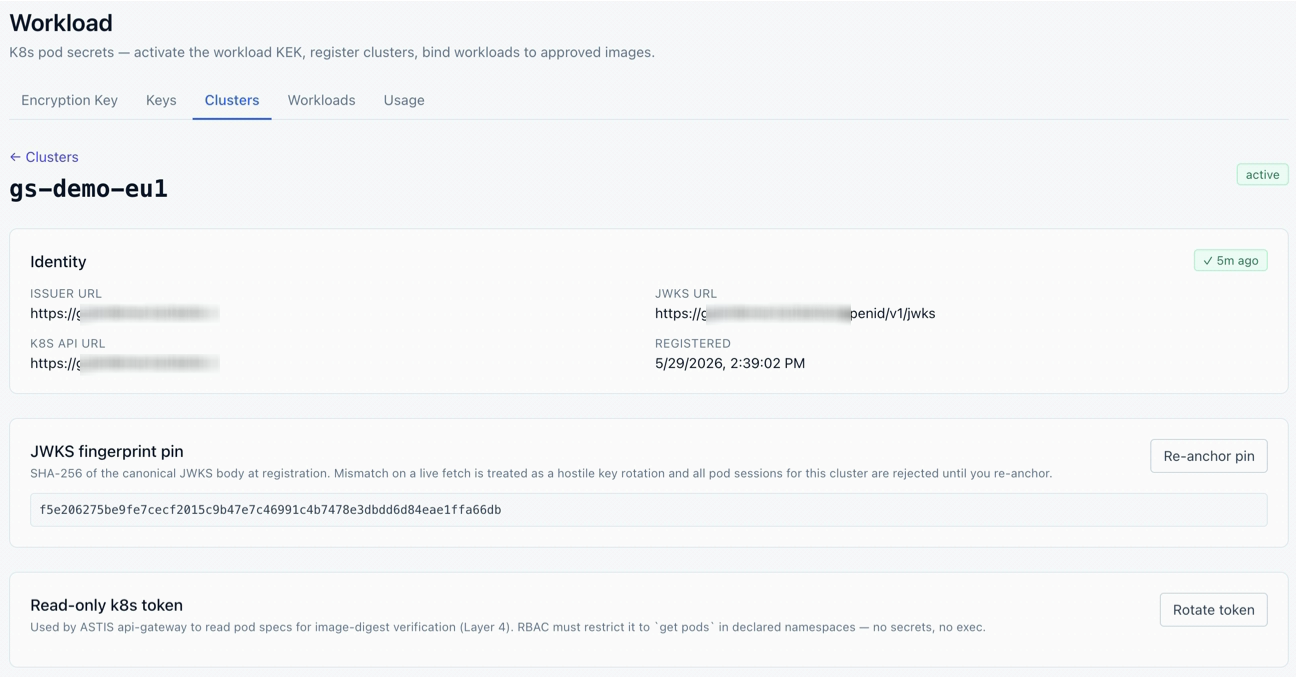
Register the cluster
admin · ClustersGive ASTIS the cluster OIDC issuer + JWKS and a read-only get-pods token. ASTIS pins the JWKS at registration — a silent key rotation is rejected.
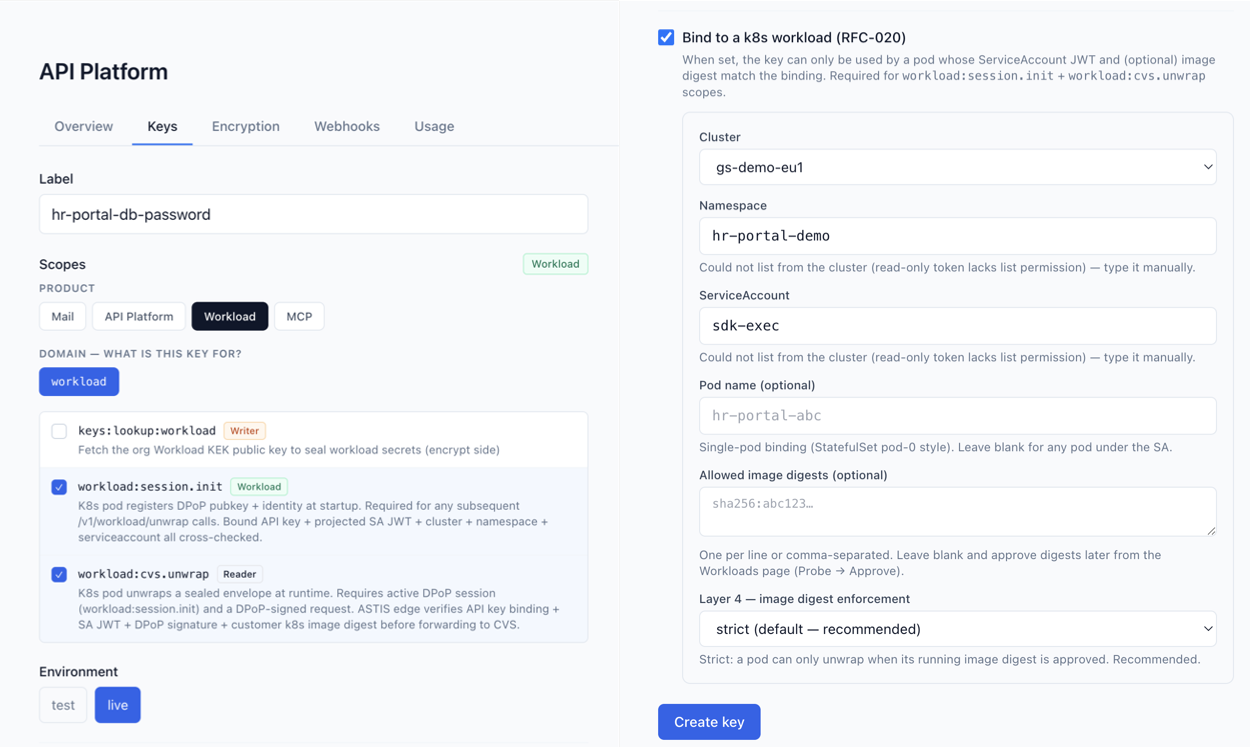
Create a Workload-bound key
admin · KeysProduct = Workload, scopes for seal + unwrap, bound to cluster / namespace / serviceaccount. The key is useless off this workload.
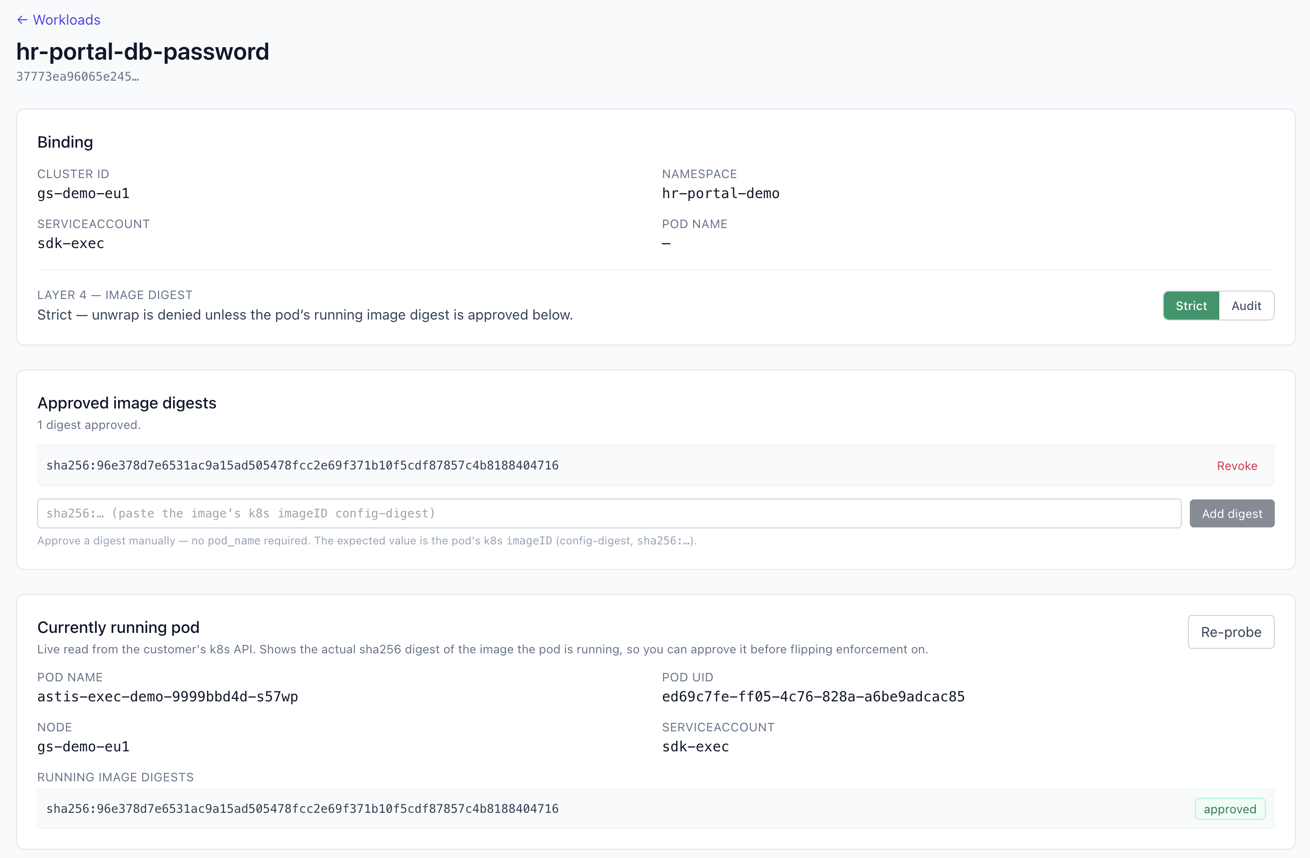
Approve the image (Layer 4)
admin · WorkloadsProbe the running pod, see its real sha256, approve it, then flip to Strict — now an unapproved image can't unseal.
Get the tooling
astis-cli (seal) and astis-exec (pod-side unsealer). Every build ships a SHA-256 checksum and a detached PGP signature — signed hash-first through the same zero-knowledge signing API customers use (the signer never sees the file). The installer detects your OS/arch, verifies the checksum, and fails closed if there's no build for your platform or the checksum doesn't match.
# seal CLI (client-side)
$ curl -fsSL https://raw.githubusercontent.com/astis-io/releases/main/install/astis-cli.sh | sh

# pod-side unsealer
$ curl -fsSL https://raw.githubusercontent.com/astis-io/releases/main/install/astis-exec.sh | sh
Platform not built yet? The installer lists what's available — or ask for a build.